
92Trade Game Download APK 2026 for Android, iOS and PC
Description
92Trade Game is a mobile-first gaming platform that puts many forms of digital entertainment in one simple interface. The latest version may update the navigation, game categories, account tools, and promotion areas. Before the 92Trade APK download, check the newest version, confirm it works on your Android device, and read the installation requirements. Always verify the app’s source, version, permissions, and the platform’s terms before you install or use it.
Must Try: PAKTop Game
What Is the 92Trade Game?
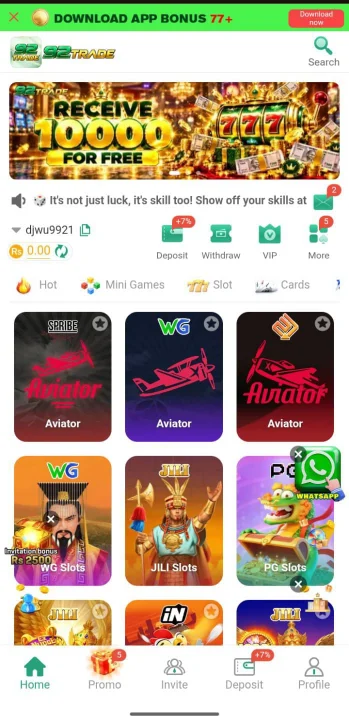
92Trade APK gives mobile users many kinds of digital entertainment through one app or one online interface. The latest version may include casino-style games, slot-based activities, card games, number games, and other interactive categories, plus account management tools and promotional sections.
Checking the 92Trade APK Updated Version? Explore the interface, see which features are live, and confirm it fits your device first. Registration and login may open your account and profile settings, and wallet features may exist depending on the services currently offered. Nothing is fixed — games, bonuses, payment methods, and features change between versions. Verify the source, read the terms, privacy policy, and your local laws, check every offer and payment feature with care, and never treat rewards or earnings as guaranteed.
92 Trade Game Features
Every feature is built to improve the mobile gaming experience, though the exact options can vary by app version and region.
Simple User Interface
A clean, beginner-friendly layout. Menus, icons, and category buttons keep every section in view, so you can move between the home screen, games, your account, the wallet, and promotions without complicated steps.
Multiple Game Categories
Different game categories sit inside one app, so you can switch between types of entertainment instead of sticking to a single game format.
Account Management
Registered users may get a dashboard to manage settings and account information in one place — profile details, login settings, transaction history, and promotional updates.
Wallet Section
The wallet keeps all account transactions in one area: add funds, check your balance, request a withdrawal, and view transaction details, depending on the current features. Read the terms and conditions before using any payment or wallet feature.
92 Trade Game Categories
The categories depend on the version you use, and collections change over time as titles are added, removed, or updated.
Slot-Style Games
A common sight on mobile gaming platforms, built on different themes, symbols, animations, and winning combinations. Each title looks different, so there are plenty of themes to explore.
Card Games
Card-based games offer another style of entertainment, with different formats and ways of playing. Each game has its own instructions and rules, so beginners should learn how a game works before starting.
Number-Based Games
These activities are built around numbers, player selections, or outcome-based mechanics. The formats available depend on the current platform version.
Casino-Style Games
Digital games built around classic casino themes, featuring cards, wheels, tables, numbers, and other interactive elements. Check each game’s instructions, because rules and features differ from title to title.
How to Download 92Trade Game APK
You need the latest version that matches your phone, installed on your Android smartphone.
Steps to Download 92Trade Game
- Find the latest available version of the 92Trade Game APK.
- Check the APK version and confirm it is compatible with your Android device.
- Download the APK file to your smartphone.
- Open the downloaded file on your device.
- Allow installation from the relevant Android source, if your phone asks for it.
- Start the installation process.
- Wait until the app is fully installed.
- Open the app and continue with registration or login.
One safety rule: never install unknown or modified APK files — they may carry unwanted changes or ask for permissions the app does not need.
How to Install 92Trade Game on Android
Installation is usually simple when the APK file is compatible with your device.
Installation Process
Open the downloaded file from your phone’s file manager or the downloads section. If Android warns about installing from an unknown source, allow installation only for the app opening the APK. After installation, open 92Trade Game and check it runs properly. If it will not open, confirm your Android version and free storage space meet the app’s requirements.
How to Register on 92Trade Game
Creating an account unlocks features that visitors and guest users cannot use.
92Trade Game Registration Steps
- Open the 92Trade Game app.
- Tap the Register or Sign Up option.
- Fill in the information asked for.
- Choose a suitable login password.
- Complete any verification step, if one is requested.
- Review the details you provided.
- Submit the registration form.
- Log in with your newly created account.
Always enter accurate information, and keep your login details private.
How to Login to 92Trade Game
Already have an account? You can reach it through the login section.
92Trade Game Login Process
Open the app, tap the Login button, and enter your username, phone number, email, or other required account identifier with the correct password. Select the login option, and if everything matches, your account dashboard becomes available.
If login fails, check your internet connection and confirm that your credentials are correct. A password recovery option may also be available.
92Trade Game Deposit Methods
The wallet section may offer different payment options depending on the current version and your region. Local users may see mobile wallets, bank-related options, or other supported payment channels.
EasyPaisa and JazzCash
Where supported, EasyPaisa and JazzCash give Pakistani users a convenient way to pay by mobile. Availability can change, so check the payment section inside the current version before any transaction — and always confirm the account details and the amount carefully before you submit a payment.
92Trade Game Withdrawal
Through the withdrawal section, eligible users may be able to move their available balance out of the account using a supported payment method.
Withdrawal Steps
- Log in to your 92Trade Game account.
- Open the wallet section.
- Select the withdrawal option.
- Choose an available payment method.
- Enter the information required.
- Enter the amount you want to withdraw.
- Review the transaction details.
- Submit your request.
Processing times and minimum withdrawal amounts can differ, so read the current withdrawal terms carefully before you send a request.
92Trade Game Bonuses and Promotions
Promotions play a big role on mobile gaming platforms, and 92Trade Game may show different campaigns depending on the version — possibly including registration promotions, daily offers, referral programs, task-based rewards, and other promotional activities.
Registration Offers
Some platforms give benefits to newly registered users. If such an offer is available to you, read its conditions carefully before you try to claim it.
Referral Programs
Referral features may let existing users invite others through a referral link or code. The requirements and the available rewards depend on the promotion running at that time.
Daily Promotions
Daily tasks and promotional activities may also appear in the app. Check the promotions page regularly, because offers can have specific dates, conditions, or participation requirements.
92 Trade Game User Experience
The experience differs for everyone. It depends on your smartphone model, internet quality, the installed app version, and the features available to you. A mobile-friendly layout makes it easy to move between game categories, account options, promotions, and other sections, and navigation feels smoother when pages load fast and the app responds well to your taps. A stable internet connection is important, especially for online gaming sections and account features on mobile data. Newer smartphones with enough storage and updated software usually run the app more smoothly, while older devices may load slowly or face compatibility issues. Before using the latest version, check the required Android version, your available storage, the permissions, and the connection requirements.
92Trade Game Security and Account Settings
Account safety is very important on any online platform. Make a strong password, and never share your login details with any other person. Also check the app permissions before you install the app. If a permission does not look needed for the basic use of the app, check that request with care.
Protect Your Login Details
Never share your password, verification codes, or account credentials through public messages. Also, do not use the same password for many important accounts. Keep the app updated. An updated app can give you the newest features. It can also give you the newest fixes.
92Trade Game on Different Devices
92Trade Game is mainly a mobile platform. It is mostly talked about for Android users. A device can run the app only if it meets the app’s technical needs.
Android Phones
Android phones are the main devices for APK apps. Check your Android version before you install the app.
iPhone and iOS
An official iOS version may be available. If it is available, iPhone users should use the install method given by the platform. An Android APK cannot normally be installed on an iPhone.
PC and Laptop
Some users want to use mobile apps on a computer. This is possible only if the platform has an official web version. It can also depend on other supported options from the platform.
Tips for Using 92Trade Game
New users can follow some simple steps. These steps make it easy to move around the app.
Explore the Interface First
First, look at the app. See the menus. See the game categories. Do this before you use the account or wallet features. This helps you learn where each thing is.
Read Game Instructions
Each game can have different rules. Each game can have different controls. Read the instructions of a game before you start it.
Check Updated Information
Game collections can change. Payment methods can change. Promotions can change. App versions can change. Always check the newest information inside the current version of the app.
Keep Your Account Secure
Use a strong password. Do not share your personal login details. The platform may give extra security settings. If it does, check those settings with care.
92Trade Game Pros and Cons
| Pros | Cons |
|---|---|
| Easy to use on a mobile phone | Features may change in new versions |
| Many types of entertainment in one place | Availability can depend on your region |
| Simple registration process | Payment options may vary |
| Account and wallet sections | You should check Android compatibility |
| Promotional sections may be available | Some features may require registration |
Final Thoughts on 92Trade Game
The 92Trade Game Updated Version brings entertainment categories, account management tools, promotional sections, and wallet-related features together in a smartphone-friendly design for Android users. Before you go for the 92Trade Game APK Download, check the source of the app. Check the version details. Check if the app works on your device. Check the permissions the app asks for. Also read the platform’s terms. Read its privacy policy. Read the bonus conditions. Check the available payment methods. Do all this before you create an account or make a transaction. Features and promotional offers can change with time. Rewards and earnings are never guaranteed.
FAQs
What is 92Trade Game?
92Trade Game is a mobile gaming platform. Users can explore different types of digital entertainment in it. Users can also use account-related features in it.
Is 92Trade Game available for Android?
The platform may be available as an Android APK. Check the newest version before you install it. Also check the compatibility requirements for your phone.
How can I register on 92Trade Game?
Open the app. Select the registration option. Give the information the app asks for. Finish any verification process shown on the screen.
Can I use EasyPaisa or JazzCash with 92Trade Game?
Payment methods depend on the current version. They also depend on your region. If EasyPaisa or JazzCash is supported, the options will show in the wallet or payment section.